Make a Spooky Halloween AI Video

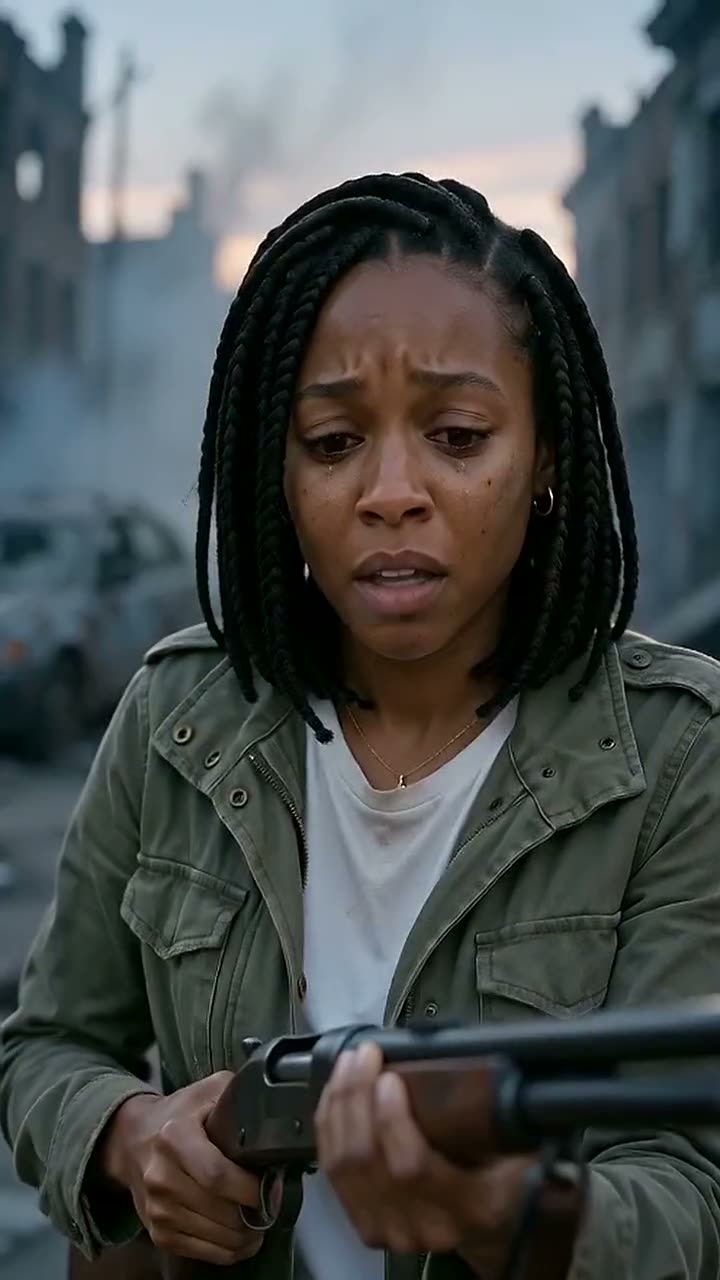
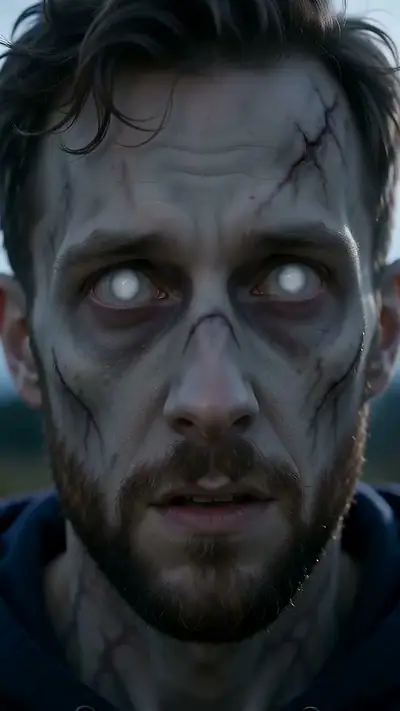
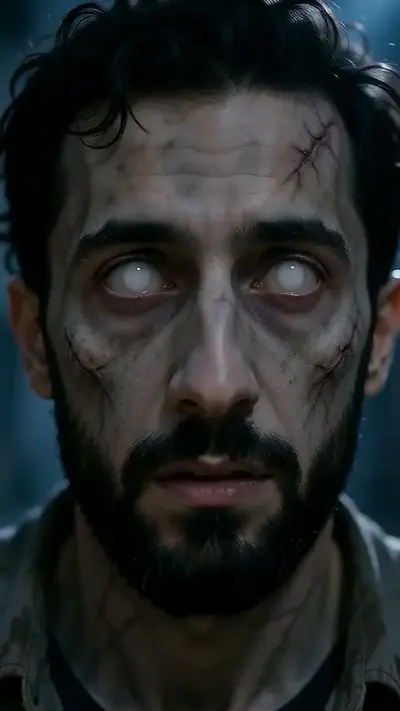
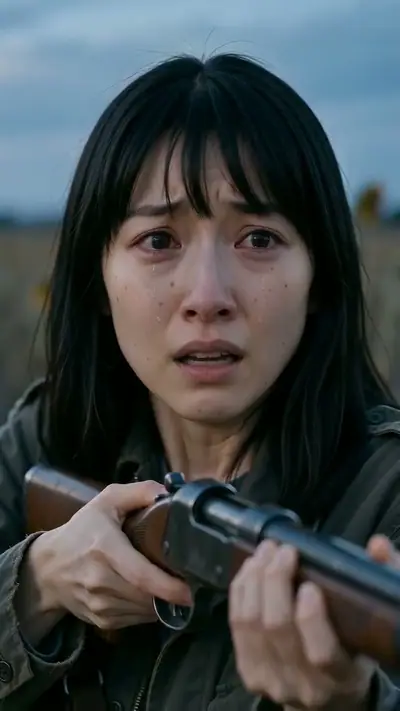
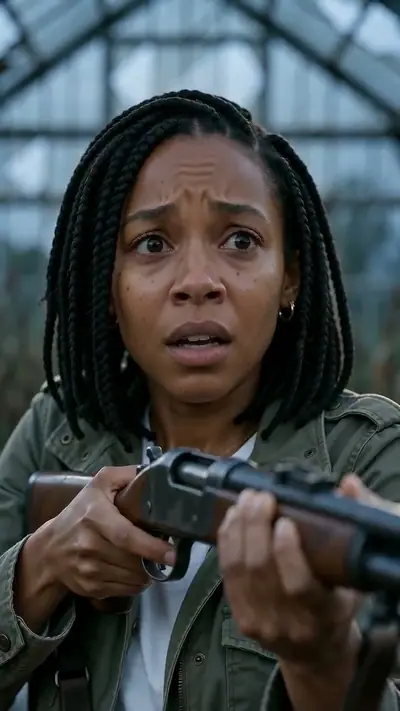
Halloween example: A Halloween AI video turns two portraits into a spooky 15-second story set in a misty pumpkin patch.

Making a Halloween AI video is a fast, fun way to celebrate spooky season without the messy makeup. Upload two portraits to watch a tense pumpkin patch standoff melt into an emotional embrace.

15 s9:16HD 720pWith soundTwo adult portraits.$9.90 = 2 videos (your story + 1 free role swap)

Person who turns

Person who stays

Aspect ratio
Variant

Acceptable use

Make my video · $9.90 for 2 videos

Stripe Checkout / PayPal

$9.90 = 2 videos (your story + 1 free role swap) · $4.95 per clip

Updated

Halloween example: A Halloween AI video turns two portraits into a spooky 15-second story set in a misty pumpkin patch.
The photo used for this example: Halloween

Halloween AI video examples

A Halloween AI video turns two portraits into a spooky 15-second story set in a misty pumpkin patch. One person becomes an undead creature while the survivor embraces them, sparking a sunlit autumn memory. Last Hug AI delivers your 720p HD video with sound in minutes, with no signup required.

Generated

You get

Two adult portraits. Confirm your photo rights and that both adults agreed to be in the video. MP4, 15 s at 720p, 9:16. Model-generated sound. $9.90; about 3–6 minutes.

Make my video

What is the Halloween trend?

Bring eerie autumn chills to your social channels with a specialized holiday narrative. By default, this experience places your two portraits in a misty, lantern-lit pumpkin field at twilight. One person roams the patch as an infected creature, stalking toward the survivor. When the survivor drops their defenses to welcome the creature, their leap cuts abruptly to a joyful memory among sunny autumn pumpkins. The resulting 15-second 720p HD video features eerie atmospheric sound. You can also explore ruined streets, sunflower fields, or marigolds. Every video includes an extra free role swap so both participants get to be the monster.

How to make a Halloween AI video in 3 steps

  1. 1. Upload Autumn Snapshots

    Pick two clear portraits of consenting adults. No costumes or face paint needed.

    Photo needed: Two adult portraits.

  2. 2. Keep the Pumpkin Field

    The misty pumpkin patch is selected by default. Choose vertical 9:16 or horizontal 16:9.

  3. 3. Receive Your Holiday Clip

    Enter your email at checkout. Within minutes, get your primary clip and your free role swap.

What you upload and what you get

You upload

Two adult portraits.

Bring spooky autumn vibes to your feed with a cinematic holiday story. By default, your two portraits appear in a misty, lantern-lit pumpkin patch at dusk. One person stalks forward as an infected creature toward the survivor. When the survivor steps in for a hug, the scene snaps into a bright, warm memory among golden pumpkins. The 15-second 720p HD video includes atmospheric sound. You can also pick ruined streets, sunflower fields, or marigolds.

Use JPG, PNG, WebP, HEIC, up to 30 MB. Photos are resized before upload. You can swap the picture before you start. You must be 18 or older. Confirm your photo rights and that both adults agreed to be in the video. We delete uploads after 7 days and never use them to train models.

You get

MP4, 720p, 9:16, 15 s. Model-generated sound.

A single $9.90 purchase gives you 2 videos. The first is your 15-second 720p HD pumpkin patch clip with eerie sound. The second is your free role swap, where the other person turns into the monster instead. Both come in vertical 9:16 by default, or 16:9 widescreen if you prefer. Want more? Three videos are $19.90 and ten are $49.90, each with its own role swap. Everything arrives via a private email link without creating an account.

$9.90 = 2 videos (your story + 1 free role swap) Compare packs before buying more credits.

Photo tips for a better Halloween video

For the best pumpkin patch scene, pick clear headshots with good lighting. Regular daytime photos make the creature transformation look surprisingly striking.

  • Use everyday portraits; the AI adds the spooky theme and creature details automatically.
  • Make sure both faces have clear, even lighting without harsh shadows.
  • Frame each person from the chest up so movement looks natural.
  • Skip sunglasses, masks, plastic fangs, and heavy holiday stickers.

What can go wrong with a Halloween AI video

Costumes interfere with features

Use plain portraits without masks or face paint so the AI clearly sees your features.

Atmosphere feels too gloomy

The moody dusk opening is intentional. The hug always resolves into a bright autumn memory.

Render interrupted by safety filters

Credits return immediately to your balance so you can pick an alternative clear image.

A generation that fails returns its credits automatically. If a delivered video has distorted details, email support@zombiecouplevideo.dev with its link for review.

Halloween AI video ideas

Liven up your feed with glowing jack-o'-lanterns, foggy harvest fields, and emotional Halloween moments your friends will love.

Zero-Effort Couples Costume

Skip the sticky fake blood and share an apocalyptic pumpkin patch clip with your partner instead.

Spooky Party Invitation

Add your custom horror-romance clip to digital invites to get friends excited for October festivities.

October Anniversary Tribute

Celebrate an autumn milestone with a story proving love outlasts even the darkest Halloween nights.

Double-Feature Social Stories

Post your creature reveal in the morning, then share the free role swap on Halloween night.

Halloween AI FAQ

Is this Halloween generator free?
No. $9.90 gets you 2 videos: the 15-second Halloween clip and a free role swap of the same scene with the roles reversed.
How are our pictures protected?
We delete your photos from our storage after 7 days. Your finished video stays unlisted and private unless you share the link.
How quickly does the clip render?
Expect your spooky clip in a matter of minutes; the finished file arrives as a private link in your inbox.
Can I request a refund?
Yes. If you have not used your credits, email us within 14 days of purchase for a full refund. Failed renders return your credits right away.
Is there an account to create first?
No profile creation needed. You only supply an email when checking out with Stripe, where we send your finished spooky scenes.
Can I get landscape 16:9 format?
Yes, you can toggle between the 9:16 vertical standard for TikTok/Reels and 16:9 widescreen before hitting the generate button.
What is included with the role reversal feature?
Every order includes an alternate clip where roles flip: the other person becomes the pumpkin patch monster while you stay human.
Do we need costume makeup in the photos?
No. Everyday photos work best because our AI adds the creature effects and mood automatically.
Are photos private?
Private links; uploads deleted within 7 days. No model training.
How long until delivery?
Usually 3–6 minutes. Private links arrive by email.

Discover Other Haunting Vibes

Browse alternative post-apocalyptic themes, romantic scenes, and emotional relationship stories.

Generate Your Halloween Story

Make my video

No subscription needed. Pack credits never expire.